We shouldn’t have to remind you how important technology is in our world today or that an online presence is a necessity regardless of your business or industry.Whether you are a business owner, student, or just really enjoy learning new things; below we outline some of the jargon you will hear from your developer or designer when addressing your website.
Home Page / Landing Page
The home page is simply where you land when first entering a website. Your home page is your “5 seconds of fame”. Put your most eye-catching photo and selling point on this page to draw the visitor in. You want to intrigue them enough to encourage perusing of other pages on your site.
Inside Pages
The inside pages of a website are all pages except the homepage. They can be accessed through the site navigation (see below) or other body copy links. Inside pages can be accessed directly by entering the specific page web address. This address is dependent on the site navigation but the basic web address layout can be seen below.
www.website.com/services-page
 Navigation
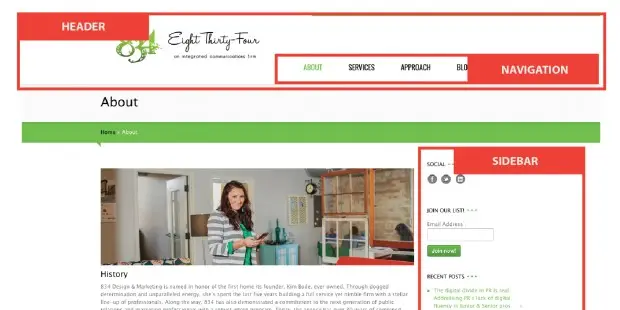
The navigation of a website is what allows a visitor to move around the site and visit different pages. Commonly found at the top of a web page the navigation bar lists the main pages of the site (about us, contact us, blog or news, services etc). A website’s navigation can also be found on the side of a page, found mostly in creative fields or portfolio websites, side navigation
 Hamburger
This icon (left) depicts a menu or navigation on a website. When compressing a web design to smaller screens such as phone or tablet devices the navigation must also be condensed requiring a hamburger menu in its place.
Header
The header is the top area of a website the does not change from page to page. This section usually includes main navigation and the company logo. Some sites include a super nav that is placed above the navigation bar and includes company social media links and a main phone or email callout.
Footer
Similarly to the header of a website, the footer does not change from page to page. Found at the bottom of a website, the footer usually includes a copyright notice, social media feeds, newsletter sign up, contact information and a site map.
Sidebar
A sidebar is an optional element of a website design that adds either secondary navigation or space to share upcoming events, social media feeds, newsletter form, etc.
RGB
Red. Green. Blue. While printers use Cyan, Magenta, Yellow and black ink to create a spectrum of color, computers transmit red, green and blue to create color. To maintain quality and color of images on your website, be sure that any images or graphics being added are changed to RGB color space. Below is a comparison of a CMYK and RGB images displayed online.
Responsive
With the ever-changing technology trends and the increased use of tablets and phones as a web browser, a responsive website is a must. A responsive site means that your design will respond to the change in size and reorder or reposition page elements to keep a unified design throughout devices.
Still have no idea what your designers are talking about? Check out some these resources for understanding web design and the jargon that follows.
The Web Design Industry Jargon Glossary and Resources by Smashing Magazine
The Non-Designers Guide Essential Glossary of Web Design Terms
Happy designing!